...
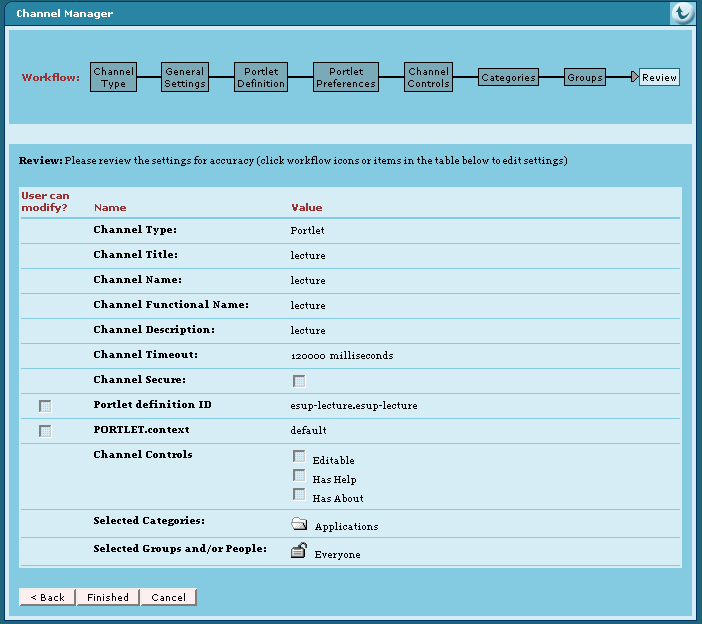
- Configure your portal to reference this portlet. For example with uPortal you can use channel manager as shown here:
| Remarque |
|---|
Portlet definition ID is very important. Here it is esup-lecture.esup-lecture. Fisrt esup-lecture must be equal to the appliation server context name and second esup-lecture must be equal to the portlet-name of the WEB-INF/portlet.xml file. |
| Remarque |
|---|
You can specify a preference with name "context" here too. See chapter 2.2.1 about context id for more information about this. |
If you don't use channel manager you can use a xml Portlet definition file. You can use this file with an uPortal ant target like ant uportal.pubchan -Dchannel=lecture-portlet.xml. For this, you have to save a lecture-portlet.xml file in the folder properties/chanpub of your uPortal distribution. This is an example of lecture-portlet.xml file :
| Bloc de code |
|---|
<?xml version="1.0" encoding="UTF-8"?>

<!DOCTYPE channel-definition SYSTEM "channelDefinition.dtd">

<channel-definition>

    <title>lecture-portlet</title>
    <name>lecture-portlet</name>
    <fname>lecture</fname>
    <desc>Esup-Portail lecture portlet</desc>
    <type>Portlet</type>
    <class>org.jasig.portal.channels.portlet.CPortletAdapter</class>
    <timeout>15000</timeout>

    <hasedit>N</hasedit>
    <hashelp>N</hashelp>
    <hasabout>N</hasabout>

    <secure>N</secure>
    <locale>en_US</locale>

    <categories>
        <category>Applications</category>
    </categories>

    <groups>
        <group>Everyone</group>
    </groups>

    <parameters>

        <!-- The syntax of the portletDefinitionId is [portlet-context-name].[portlet-name] -->
        <parameter>
            <name>portletDefinitionId</name>
            <value>esup-lecture.esup-lecture</value>
            <description>The syntax of the portletDefinitionId is [portlet-context-name].[portlet-name]</description>
            <ovrd>N</ovrd>
        </parameter>

        <parameter>
            <name>PORTLET.context</name>
            <value>default</value>
            <description>The "context" Portlet preference in relationship with context@id of the esup-lecture.xml file</description>
            <ovrd>N</ovrd>
        </parameter>

    </parameters>

</channel-definition>
|
Configuration
You can configure your application. For this: adapt file(s) in properties directory and use ant deploy to deploy again your application.
...
- urlCategory : url to get back a xml category file on a remote server
- trustCategory ( yes | no ) : If it is "yes", visibility rights used are those of remote category and sources. If it is "no", visibility rights on category and sources used are those of this category profile, defined in visibility element.
- access ( public | cas ) : access of the category is public or cas because it needs CAS proxy ticket for authentication -not yet supported -(for more information about CAS configuration see Configuration en déploiement portlet of the ESUP-Commons documentation and CAS en mode portletof the part Utilisation de CAS (French) of the of ESUP-Lecture documentation)
- ttl (seconds) : time to live of the remote category and its sources
- timeout (milliseconds) : time trying to get the category
- visibility : define group visibility for category referenced by this category profile. It is used only if trustCategory is set to "no"
...