...
- Configure your portal to reference this portlet. For example with uPortal you can use channel manager as shown here:
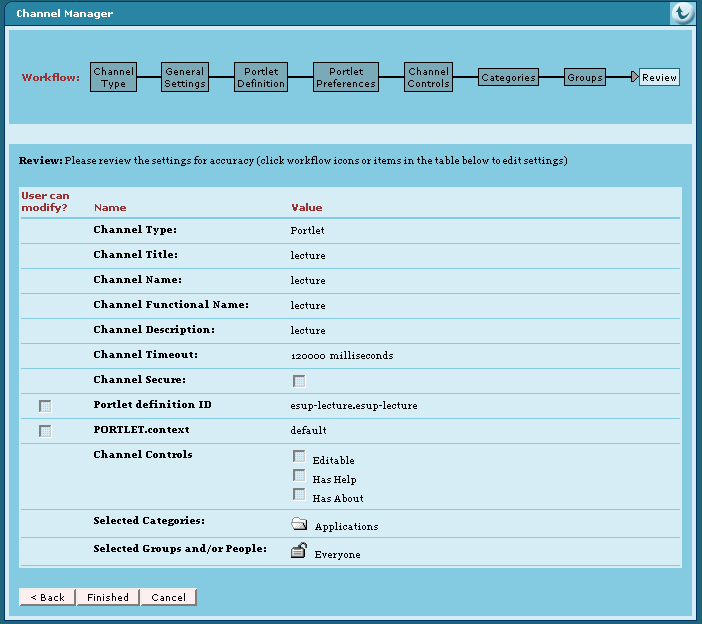
Remarque Portlet definition ID is very important. Here it is esup-lecture.esup-lecture. Fisrt esup-lecture must be equal to the appliation server context name and second esup-lecture must be equal to the portlet-name of the WEB-INF/portlet.xml file.
If you don't use this default value you have to adap the "portlet-guid" parameter of "The esup-lecture portlet servlet" servlet in the WEB-INF/web.xml too.
If you don't use channel manager you can use a xml Portlet definition file. You can use this file with an uPortal ant target like ant uportal.pubchan -Dchannel=lecture-portlet.xml. For this, you have to save a lecture-portlet.xml file in the folder properties/chanpub of your uPortal distribution. This is an example of lecture-portlet.xml file :Remarque You can specify a preference with name "context" here too. See chapter 2.2.1 about context id for more information about this.
Bloc de code <?xml version="1.0" encoding="UTF-8"?> <!DOCTYPE channel-definition SYSTEM "channelDefinition.dtd"> <channel-definition> <title>lecture-portlet</title> <name>lecture-portlet</name> <fname>lecture</fname> <desc>Esup-Portail lecture portlet</desc> <type>Portlet</type> <class>org.jasig.portal.channels.portlet.CPortletAdapter</class> <timeout>15000</timeout> <hasedit>N</hasedit> <hashelp>N</hashelp> <hasabout>N</hasabout> <secure>N</secure> <locale>en_US</locale> <categories> <category>Applications</category> </categories> <groups> <group>Everyone</group> </groups> <parameters> <!-- The syntax of the portletDefinitionId is [portlet-context-name].[portlet-name] --> <parameter> <name>portletDefinitionId</name> <value>esup-lecture.esup-lecture</value> <description>The syntax of the portletDefinitionId is [portlet-context-name].[portlet-name]</description> <ovrd>N</ovrd> </parameter> <parameter> <name>PORTLET.context</name> <value>default</value> <description>The "context" Portlet preference in relationship with context@id of the esup-lecture.xml file</description> <ovrd>N</ovrd> </parameter> </parameters> </channel-definition>
Configuration
You can configure your application. For this: adapt file(s) in properties directory and use ant deploy to deploy again your application.
...
- elementvisibility:
In this element, you define 3 groups of visibility;Bloc de code <visibility> <!-- allowed and autoSubscribed not yet supported --> <allowed/> <autoSubscribed/> <obliged> <group name="local.0"/> <group .../> ... <regular attribute="sn" value="user" /> <regular .../> ... </obliged> </visibility>- allowed : user inside are "allowed" to subscribe to a category - not yet supported -
- autoSubscribed : user inside are auto subscribed to this category and is allowed to unsubscribe - not yet supported -
- obliged : user inside are automatically subscribe to this category and can't unsubscribe - for the moment, it is the only way for users to see category -
...
- element sourceProfile in xml category file :
A source profile has an id, a name (displayed on interface) andBloc de code <sourceProfile id="un" access="public" name="Incidents techniques Rennes 1" specificUserContent="no" url="http://info.cri.univ-rennes1.fr/rss/rss.php"> <visibility> ... </visibility> </sourceProfile>
- access ( public | cas ) : access of the source is public or cas because it needs CAS proxy ticket for authentication -not yet supported -(for more information about CAS configuration see Configuration en déploiement portlet of the ESUP-Commons documentation and CAS en mode portletof the part Utilisation de CAS (French) of the of ESUP-Lecture documentation)
- specificUserContent ( yes | no) : if it is "yes", source content is specific to user. If it is "no", source content is the same for every users (If your configure with "yes" then application assumes that content can be deferent for each user (may be because of specific content due to profiling according to authentication). In this case application doesn't use any cache for the source. So be careful before use "yes" for this property.)
- url : url to get xml stream of the source
- timeout (milliseconds) : Time trying to get the source. Parent category timeout is used is it is not defined here
- visibility : define group visibility for source refered by this source profile. It is used only if trustCategory attribute of referencing categoryProfile is set to "yes" else visibility category profile is used - optional -
Remarque Be carefull to manage unique id for every sources profiles defined in categories : application does not yet manage it.
...