...
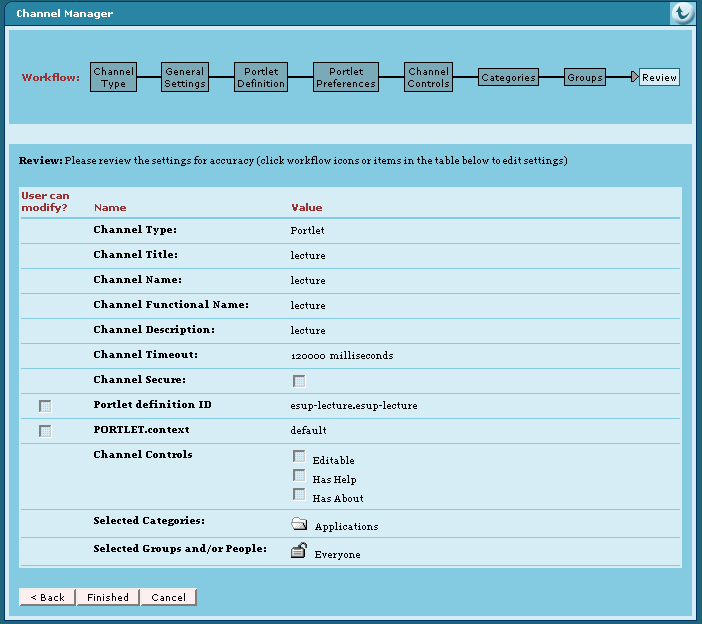
- Configure your portal to reference this portlet. For example with uPortal you can use channel manager as shown here:
| Remarque |
|---|
Portlet definition ID is very important. Here it is esup-lecture.esup-lecture. Fisrt esup-lecture must be equal to the appliation server context name and second esup-lecture must be equal to the portlet-name of the WEB-INF/portlet.xml file. |
| Remarque |
|---|
You can specify a preference with name "context" here too. See chapter 2.2.1 about context id for more information about this. |
If you don't use channel manager you can use a xml Portlet definition file. You can use this file with an uPortal ant target like ant uportal.pubchan -Dchannel=lecture-portlet.xml. For this, you have to save a lecture-portlet.xml file in the folder properties/chanpub of your uPortal distribution. This is an example of lecture-portlet.xml file :
| Bloc de code |
|---|
<?xml version="1.0" encoding="UTF-8"?>

<!DOCTYPE channel-definition SYSTEM "channelDefinition.dtd">

<channel-definition>

    <title>lecture-portlet</title>
    <name>lecture-portlet</name>
    <fname>lecture</fname>
    <desc>Esup-Portail lecture portlet</desc>
    <type>Portlet</type>
    <class>org.jasig.portal.channels.portlet.CPortletAdapter</class>
    <timeout>15000</timeout>

    <hasedit>N</hasedit>
    <hashelp>N</hashelp>
    <hasabout>N</hasabout>

    <secure>N</secure>
    <locale>en_US</locale>

    <categories>
        <category>Applications</category>
    </categories>

    <groups>
        <group>Everyone</group>
    </groups>

    <parameters>

        <!-- The syntax of the portletDefinitionId is [portlet-context-name].[portlet-name] -->
        <parameter>
            <name>portletDefinitionId</name>
            <value>esup-lecture.esup-lecture</value>
            <description>The syntax of the portletDefinitionId is [portlet-context-name].[portlet-name]</description>
            <ovrd>N</ovrd>
        </parameter>

        <parameter>
            <name>PORTLET.context</name>
            <value>default</value>
            <description>The "context" Portlet preference in relationship with context@id of the esup-lecture.xml file</description>
            <ovrd>N</ovrd>
        </parameter>

    </parameters>

</channel-definition>
|
- import lecture.css in main portal css page.
For example with esup skin in a esup-portail package :- copy esup.css form update/uPortal/webpages/media/org/jasig/portal/layout/tab-column/xhtml-theme/esup to custom/uPortal/webpages/media/org/jasig/portal/layout/tab-column/xhtml-theme/esup/skin
- adap esup.css by adding :
Bloc de code @import url("lecture.css"); - copy lecture.css in custom/uPortal/webpages/media/org/jasig/portal/layout/tab-column/xhtml-theme/esup/skin
- use ant init deploy
Configuration
You can configure your application. For this: adapt file(s) in properties directory and use ant deploy to deploy again your application.
...
- tomcat.host, tomcat.port in buil.properties file.
- casService.bean (it MUST be valued at servletCasService), ccasService.url, casService.proxyCallbackUrl in properties/config.properties file.
Remarque With these properties ant deploy will automatically make appropriate changes in your web.xml file.
Authorization
Authorizations defined in your esup-lecture.xml file or provided by news portlet are based in attributes or groups issued form uPortal. Of course, in servlet mode you don't have access to these informations naturally. So, you have to install (if not yet present in your uPortal distribution) esup-portal-ws (see http://sourcesup.cru.fr/projects/esup-portal-ws/).
...