La liste d'utilisateurs n'est pas rendue car vous ne possédez pas les droits d'accès nécessaires pour afficher les profils utilisateur.
Historique de la page
| Sommaire |
|---|
Authentication
Three authentication methods are proposed by the esup-helpdesk application:
- CAS (Central Authentication Service),
- Shibboleth (Identity Federation),
- Application (by the application itself).
CAS
esup-helpdesk can be used by both local and external users.
| Sommaire |
|---|
local/external users
...
users
Identification
Local CAS users are identified by their unique ID in the Information System, typically the LDAP uid (e.g. paubry). Their id in the database is prefixed by cas- (e.g. cas-paubry).
...
Authentication
Local CAS users are authenticated:
- for portlet deployments: by the portal thanks to CAS.
- for servlet and quick-start deployments: directly by CAS.
Astuce title Portal authentication Any authentication can be used by the portal (database, LDAP, CAS, ...); the esup-helpdesk knows who is authenticated, but not how. Technically, the connected user's id is passed to the application through JSR-168 preferences.
Profiles
Local users are characterized by their attributes in the Information System: the LDAP directory (see Configuring the LDAP access) and/or the portal (see Configuring portal information access).
External users
Identification
Profiles
CAS users are characterized by their attributes in the Information System: the LDAP directory (see Configuring the LDAP access).
Shibboleth users
Identification
Shibboleth users are identified by their ID, as provided by Shibboleth (e.g. paubry@univ-rennes1.fr). Their id in the database is prefixed by shib- (e.g. shib-paubry@univ-rennes1.fr).
Authentication
Shibboleth users are authenticated:
- for portlet deployments: by the portal thanks to Shibboleth.
- for servlet and quick-start deployments: directly by Shibboleth.
Profiles
Shibboleth users are characterized by the attributes passed to the application by:
- Shibboleth for servlet and quick-start deployments (HTTP headers)
- The portal for portlet deployments (JSR-168 preferences).
Application users
Identification
Application External users are identified by their email address (e.g. alexandre.boisseau@univ-brest.fr. pascal.aubry@gmail.com). Their id in the database is prefixed by app- (e.g. app-pascal.aubry@gmail.com).
Authentication
External Application users are authenticated by the application itself, thanks to a password. The password is generated at the account creation and sent to the users by email. The password can be re-sent to the users at any time later.
| Astuce | ||
|---|---|---|
| ||
For portlet deplymentsdeployments, the portal runs as guest for external users. |
Profiles
No attribute is avalable for external users (no link to the Information System)application users.
Administrators
The administrators of the application are true users.
...
All the authenticated users (local or external) can manage their preferences using the 'Preferences' menu. 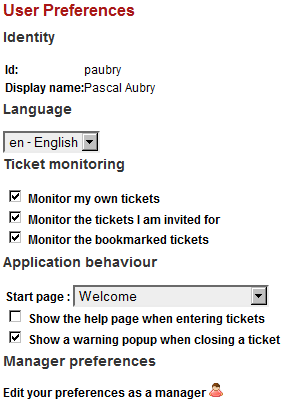
Ticket monitoring allows users to recieve alerts by email when events occur on tickets. By checking the proposed boxes, users receive emails with links that allow them to access the application directly (even when the application is deployed as a portlet in a portal).
The last link ('Edit your preferences as a manager') is show to managers only and allows them to manage their manager preferences: 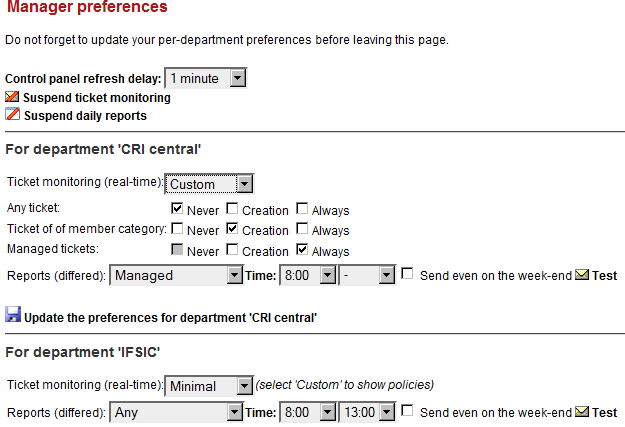
Vue d'ensemble
Gestion des contenus