Documentation en cours de rédaction
Modifications Client
Modifications à prendre en compte dans les fichiers environment*.ts
Vérification des mises à jour du client
Il est désormais possible d'activer un module qui permet de récupérer les informations de mises à jour du client auprès du backend, et de proposer (ou imposer) la mise à jour à l'utilisateur.
| 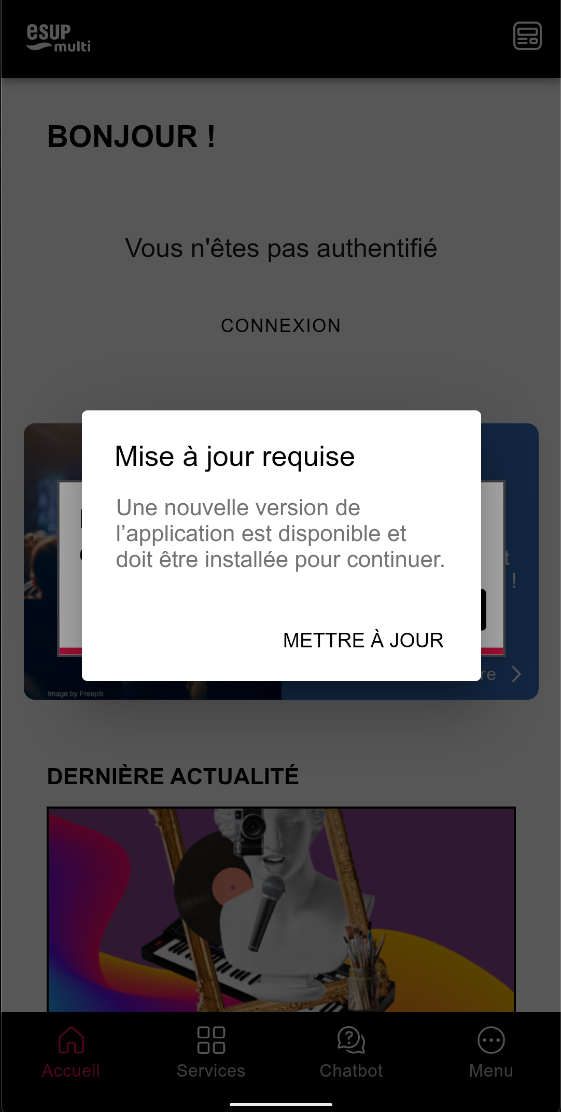 |
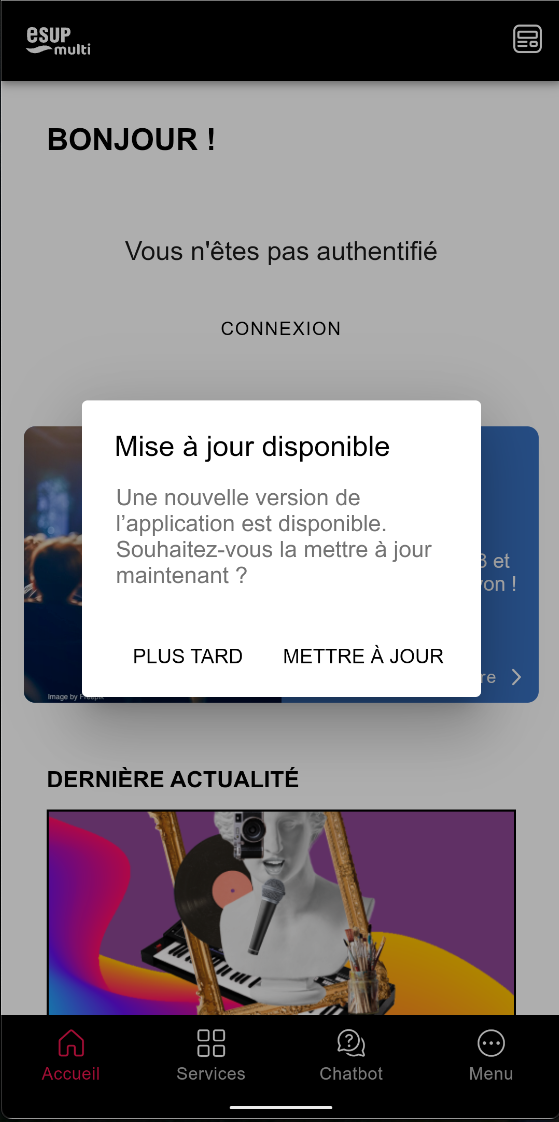
Pour activer le module, ajouter simplement AppUpdateModule dans la liste des enabledModules (en n'oubliant pas l'import du module en haut du fichier)
enabledModules: [
  AppUpdateModule,
  AuthModule,
  ...
]
Personnaliser l'affichage de la widget Calendar
Il est désormais possible de choisir entre 2 modes d'affichage pour la widget Calendar en page d'accueil
Vue 'slider' |
Vue 'list' |
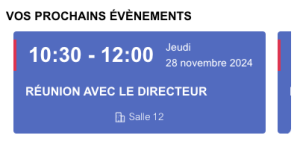
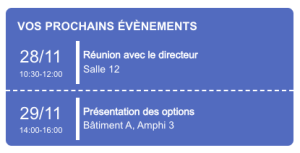
Pour prendre en compte cette nouvelle fonctionnalité, il est nécessaire d'ajouter la variable de configuration display au module CalendarModule :
CalendarModule.forRoot({
  numberOfEventsLimit: 3,
  display: 'list',
}),
Personnaliser l'affichage de la widget Schedule
Il est désormais possible de choisir entre 2 modes d'affichage pour la widget Schedule en page d'accueil
Vue 'slider' |
Vue 'list' |
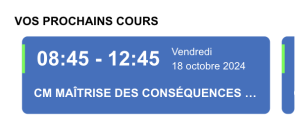
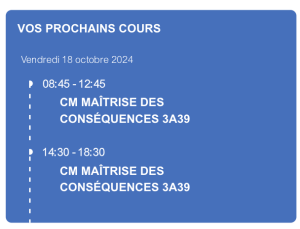
Pour prendre en compte cette nouvelle fonctionnalité, il est nécessaire d'ajouter la variable de configuration display au module ScheduleModule :
ScheduleModule.forRoot({
  nextEventsWidget: {
    numberOfEventsLimit: 2,
    numberOfDaysLimit: 7,
    display: 'slider|list'
  },
  previousWeeksInCache: 1,
  nextWeeksInCache: 2,
  managerRoles: ['schedule-manager', 'multi-admin']
}),
Modifications à prendre en compte dans le fichier angular.json
Vérification des mises à jour du client
Pour activer le module de vérification de la mise à jour du client, il est nécessaire d'ajouter sa configuration dans le fichier angular.json,
  },
  "app-update": {
    "projectType": "library",
    "root": "projects/app-update",
    "sourceRoot": "projects/app-update/src",
    "prefix": "lib",
    "architect": {
      "build": {
        "builder": "@angular-devkit/build-angular:ng-packagr",
        "options": {
          "project": "projects/app-update/ng-package.json"
        },
        "configurations": {
          "production": {
            "tsConfig": "projects/app-update/tsconfig.lib.prod.json"
          },
          "development": {
            "tsConfig": "projects/app-update/tsconfig.lib.json"
          }
        },
        "defaultConfiguration": "production"
      },
      "test": {
        "builder": "@angular-devkit/build-angular:karma",
        "options": {
          "main": "projects/app-update/src/test.ts",
          "tsConfig": "projects/app-update/tsconfig.spec.json",
          "karmaConfig": "projects/app-update/karma.conf.js"
        }
      },
      "lint": {
        "builder": "@angular-eslint/builder:lint",
        "options": {
          "lintFilePatterns": [
            "projects/auth/**/*.ts",
            "projects/auth/**/*.html"
          ]
        }
      }
    }
  },
Modifications à prendre en compte dans les fichiers de theming
Prise en compte des images SVG dans les Widgets
Il est désormais possible d'ajouter une image au format SVG à un widget au travers de l'interface de saisie de Directus.
Pour que celle-ci s'affiche correctement, il est nécessaire de modifier le CSS
Dans le fichier widget-external-feature.component.scss, ajoutez le bloc suivant :
app-custom-icon {
  vertical-align: text-top;
}
Dans le fichier widget-internal-feature.component.scss, remplacez le bloc .feature-title comme suit :
.feature-title {
  padding: 1rem 1rem 0.2rem;

  app-custom-icon {
    vertical-align: text-top;
  }
}
Personnaliser l'affichage de la widget Calendar
Le fichier dev/user-frontend-ionic/src/theme/app-theme-dist/styles/calendar/calendar.component.scss a été revu complètement pour gérer 2 blocs .calendar-list-style ou .calendar-slider-style pour pouvoir prendre en compte les 2 types d'affichage possible pour la widget
ndar-list-style {

  display: block;

  .ion-padding {
    padding-top: 5px !important;
  }

  .events-container {
    padding: 0;
  }

  .event {
    align-items: center;
    padding: 0.5rem 0;
  }

  hr {
    border-top: 2px dashed var(--ion-color-primary-contrast);
    margin: 0;
  }

  .event-part ion-text {
    display: block
  }

  .event-part-date {
    flex-grow: 1;
    text-align: center;
    border-right: 5px solid var(--ion-color-primary-contrast);
    margin-right: 5px;
  }

  .event-part-info {
    flex-grow: 3;
  }

  .light-font-color{
    color: var(--app-font-color-for-dark-background-from-cms) !important;

    hr {
      border-top: 2px dashed var(--app-font-color-for-dark-background-from-cms);
      margin: 0;
    }

    .event-part-date {
      border-right: 5px solid var(--app-font-color-for-dark-background-from-cms);
    }
  }

  .dark-font-color{
    color: var(--app-font-color-for-light-background-from-cms) !important;

    hr {
      border-top: 2px dashed var(--app-font-color-for-light-background-from-cms);
    }

    .event-part-date {
      border-right: 5px solid var(--app-font-color-for-light-background-from-cms);
    }
  }

}

.calendar-slider-style {
  display: block;

  ion-card {
    scroll-snap-align: center;
  }

  ion-card.slider-theme-color {
    box-shadow: var(--app-border-no-box-shadow);
    //border: var(--app-border-width-7) solid var(--app-border-color-primary);
    background-color: var(--ion-color-tertiary);
  }

  ion-card-content {
    padding: 0.7rem 0;
    height: 100%;
    display: flex;
    flex-direction: column;
  }

  .events-container {
    padding: .5rem 0 0;
    display: grid;
    gap: 1rem;
    grid-auto-flow: column;
    grid-template-columns: 10px;
    grid-auto-columns: 85%;
    overflow-x: auto;
    scrollbar-width: none;
    scroll-snap-type: x mandatory;
    overscroll-behavior-x: contain;

    &::-webkit-scrollbar {
      display: none;
    }

    &::before,
    &::after {
      content: '';
      width: 10px;
    }

    .event-day-hour {
      display: flex;
      flex-direction: row;
      border-left-width: 4px;
      border-left-style: solid;
      align-items: center;
      flex-wrap: nowrap;
      border-color: var(--ion-color-secondary);

      .hour {
        padding-left: 1rem;
        display: block;
      }

      .day {
        padding-left: 1rem;
        display: block;

        ion-text {
          display: block;
        }
      }
    }
  }

  .card-labels {
    margin-right: 0.6rem;
  }

  .card-labels-icons {
    margin-right: 0.3rem;
  }

  .event-label {
    padding: 1rem 1rem 0;
    white-space: nowrap;
    overflow: hidden;
    text-overflow: ellipsis;
  }

  .event-additional {
    display: flex;
    padding: 0.7rem 0.5rem 0;
    justify-content: space-evenly;
    flex-wrap: wrap;
    flex-grow: 2;
    align-items: center;

    ion-row:last-child {
      margin-right: 0;
    }
  }

  .slider-font-color{
    color: var(--app-font-fix-light-color) !important;
  }

  .light-font-color{
    color: var(--app-font-color-for-dark-background-from-cms) !important;
  }

  .dark-font-color{
    color: var(--app-font-color-for-light-background-from-cms) !important;
  }

}
Personnaliser l'affichage de la widget Schedule
Le fichier dev/user-frontend-ionic/src/theme/app-theme-dist/styles/schedule/next-events.component.scss a été revu complètement pour gérer 2 blocs .next-events-list-style ou .next-events-slider-style pour pouvoir prendre en compte les 2 types d'affichage possible pour la widget
Décalage du bouton 'Lire plus' sur iOS
Il existait un décalage sur le bouton 'Lire plus' sur les flux d'actualités sur iOS. Pour corriger ce décalage le CSS a été revu.
dev/user-frontend-ionic/src/theme/app-theme-dist/styles/rss/latest-news.component.scss
.link-button {
  min-height: auto;
  margin: 0 0 0.5rem;
  --padding-end: 0.7rem;
}
dev/user-frontend-ionic/src/theme/app-theme-dist/styles/rss/rss.page.scss
.link-button {
  min-height: auto;
  margin: 0 0 0.5rem;
}
Modifications à prendre en compte dans les fichiers de traduction
Personnaliser l'affichage de la widget Schedule
"NEXT_EVENTS": {
  "NO_EVENTS": "No courses soon",
  "LIMIT_TEACHERS": "others"
}
"NEXT_EVENTS": {
  "NO_EVENTS": "Pas de cours prochainement"
  "LIMIT_TEACHERS": "autres"
}
Utiliser la nouvelle fonctionnalité de détection des mises à jour du client
Le module qui vérifie les mises à jour du client disponibles affiche des alertes. Il est possible de traduire le texte de ces alertes.
Pour bénéficier des traductions de ces alertes copier le dossier src/theme/app-theme-dist/i18n/app-update/ dans le répertoire i18n de votre application (par défaut src/theme/app-theme/i18n/)
{
  "MANDATORY_UPDATE_ALERT": {
    "HEADER": "Update Required",
    "MESSAGE": "A new version of the application is available and must be installed to continue.",
    "UPDATE_NOW": "Update Now"
  },
  "OPTIONAL_UPDATE_ALERT": {
    "HEADER": "Update Available",
    "MESSAGE": "A new version of the application is available. Would you like to update now?",
    "UPDATE_NOW": "Update Now",
    "UPDATE_LATER": "Later"
  }
}
{
  "MANDATORY_UPDATE_ALERT": {
    "HEADER": "Mise à jour requise",
    "MESSAGE": "Une nouvelle version de l’application est disponible et doit être installée pour continuer.",
    "UPDATE_NOW": "Mettre à jour"
  },
  "OPTIONAL_UPDATE_ALERT": {
    "HEADER": "Mise à jour disponible",
    "MESSAGE": "Une nouvelle version de l’application est disponible. Souhaitez-vous la mettre à jour maintenant ?",
    "UPDATE_NOW": "Mettre à jour",
    "UPDATE_LATER": "Plus tard"
  }
}
Modifications Backend
main
=> Ajout du fichier client-infos.json à reprendre à partir du fichier .dist
µservice Map
=> Suppression du fichier dev/user-backend-nest/microservices/map/src/map/map-data.json du repository et ajout de ce dernier au fichier .gitignore
Ajout d'un fichier .dist avec des données épurées
Entraine une suppression du fichier en local au moment de la pull request => Bien enregistrer les données au préalable