Architecture
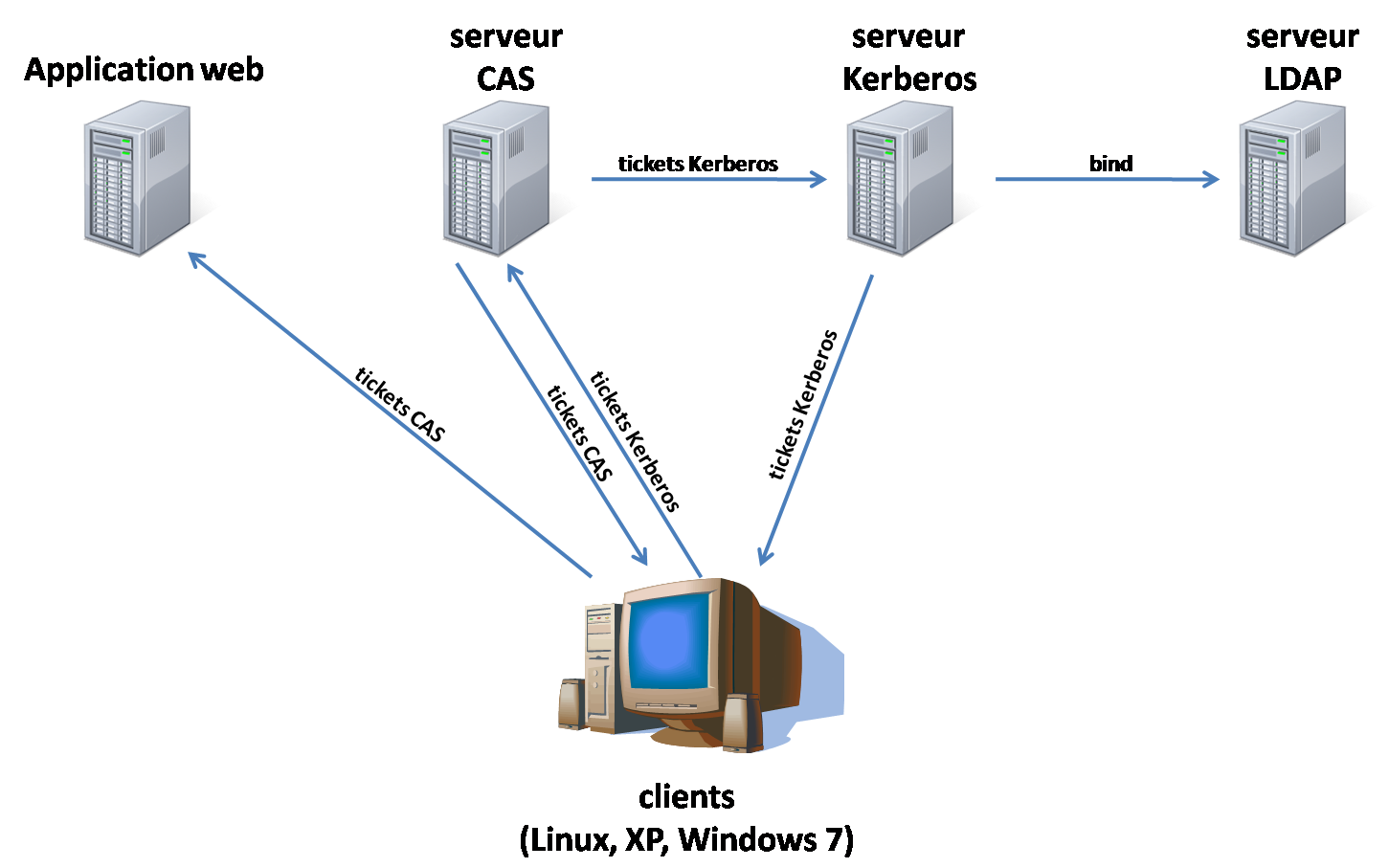
Roadmap
Générer les clients Linux, Windows XP et Windows 7.
Mettre en place un serveur Kerberos s'appuyant sur le serveur LDAP.
Valider l'installation en configurant les clients pour qu'ils s'authentifient sur le serveur Kerberos et montent les homedirs des utilisateurs.
Mettre en place un serveur CAS s'appuyant sur le serveur Kerberos, capable de valider les tickets Kerberos des navigateurs des clients.
Valider en testant le SSO depuis les différents clients.
Machines mises en place
Nom |
Rôle |
|---|---|
kerb.ifsic.univ-rennes1.fr (148.60.10.50) |
Serveur Kerberos |
cas.ifsic.univ-rennes1.fr (148.60.10.51) |
Serveur CAS |
clinux.ifsic.univ-rennes1.fr (148.60.10.52) |
Client Linux |
cwinxp.ifsic.univ-rennes1.fr (148.60.10.53) |
Client Windows XP |
cwin7.ifsic.univ-rennes1.fr (148.60.10.54) |
Client Windows 7 |
Installation et configuration des machines
Pour toutes les machines :
- Netmask : 255.255.255.0
- Gateway : 148.60.10.254
- DNS : 148.60.4.1
- NTP : ntp1.univ-rennes1.fr
Serveur Kerberos
Installation système
Boot sur CD Fedora 10.
- FQDN : kerb.ifsic.univ-rennes1.fr
- IP : 148.60.10.50
Packages additionnels installés :
- Servers -> Network servers -> kerb5-server
Configuration NTP
Configuration Kerberos
Modification de quelques fichiers de configuration pour créer le royaume IFSIC.TEST.
/etc/krb5.conf
[libdefaults]
 default_realm = IFSIC.TEST
 default_etypes = des3-hmac-sha1 des-cbc-crc
 default_tkt_enctypes = des3-hmac-sha1 des-cbc-crc
 default_tgs_enctypes = des3-hmac-sha1 des-cbc-crc
 permitted_enctypes = des3-hmac-sha1 des-cbc-crc rc4-hmac
/var/kerberos/krb5kdc/kdc.conf
[realms]
 IFSIC.TEST = {
  #master_key_type = aes256-cts
  acl_file = /var/kerberos/krb5kdc/kadm5.acl
  dict_file = /usr/share/dict/words
  admin_keytab = /var/kerberos/krb5kdc/kadm5.keytab
  supported_enctypes = aes256-cts:normal aes128-cts:normal des3-hmac-sha1:normal arcfour-hmac:normal des-hmac-sha1:normal des-cbc-md5:normal des-cbc-crc:normal des-cbc-crc:v4 des-cbc-crc:afs3 rc4-hmac:normal
 }
/var/kerberos/krb5kdc/kadm5.acl
*/admin@IFSIC.TEST *
/etc/gssapi_mech.conf
En 64 bits seulement :
# library                               initialization function
# ================================      ==========================
# The MIT K5 gssapi library, use special function for initialization.
libgssapi_krb5.so                       mechglue_internal_krb5_init
Création de la base Kerberos :
[root@kerb ~] kdb5_util create -s
Ajout du premier utilisateur (root) :
[root@kerb ~] kadmin.local -q "addprinc root/admin"
Démarrage des services (auparavant arrêter SeLinux) :
[root@kerb ~] setenforce 0
[root@kerb ~] chkconfig kadmin on
[root@kerb ~] service kadmin start
[root@kerb ~] chkconfig krb5kdc on
[root@kerb ~] service krb5kdc start
Vérification en affichant la liste des principals :
[root@kerb ~]# kadmin
Authenticating as principal root/admin@IFSIC.TEST with password.
Password for root/admin@IFSIC.TEST:
kadmin:  listprincs
K/M@IFSIC.TEST
kadmin/admin@IFSIC.TEST
kadmin/changepw@IFSIC.TEST
kadmin/history@IFSIC.TEST
kadmin/kerb.ifsic.univ-rennes1.fr@IFSIC.TEST
krbtgt/IFSIC.TEST@IFSIC.TEST
ldap/zag.ifsic.univ-rennes1.fr@IFSIC.TEST
root/admin@IFSIC.TEST
Ajout d'un principal pour le KDC lui-même (indispensable pour la réplication) :
[root@kerb ~]# kadmin
Authenticating as principal root/admin@IFSIC.TEST with password.
Password for root/admin@IFSIC.TEST:
kadmin:  addprinc -randkey host/kerb.ifsic.univ-rennes1.fr
WARNING: no policy specified for host/kerb.ifsic.univ-rennes1.fr@IFSIC.TEST; defaulting to no policy
Principal "host/kerb.ifsic.univ-rennes1.fr@IFSIC.TEST" created.
Ajout d'un utilisateur (kerb) pour les tests :
[root@kerb ~]# kadmin
Authenticating as principal root/admin@IFSIC.TEST with password.
Password for root/admin@IFSIC.TEST:
kadmin:  addprinc kerb
WARNING: no policy specified for kerb@IFSIC.TEST; defaulting to no policy
Enter password for principal "kerb@IFSIC.TEST":
Re-enter password for principal "kerb@IFSIC.TEST":
Principal "kerb@IFSIC.TEST" created.
Serveur CAS
Boot sur CD Fedora 10.
- FQDN : cas.ifsic.univ-rennes1.fr
- IP : 148.60.10.51
Serveur LDAP
Il est sur zag.ifsic.univ-rennes1.fr et est appelable en ldaps (certificat auto-signé).
Il contient 2 entrées (dagorn et paubry).
Ci-dessous une entrée :
ldapsearch -H "ldaps://zag.ifsic.univ-rennes1.fr" -b "dc=univ-rennes1,dc=fr" -x 'uid=dagorn'
# extended LDIF
#
# LDAPv3
# base <dc=univ-rennes1,dc=fr> with scope subtree
# filter: uid=dagorn
# requesting: ALL
#
# dagorn, people, univ-rennes1.fr
dn: uid=dagorn,ou=people,dc=univ-rennes1,dc=fr
loginShell: /bin/bash
employeeNumber: 2848
sn: Francois Dagorn
gidNumber: 1000
objectClass: top
objectClass: inetOrgPerson
objectClass: posixAccount
objectClass: person
objectClass: shadowAccount
objectClass: organizationalPerson
mail: Francois.Dagorn@univ-rennes1.fr
givenName: fd
uid: dagorn
uidNumber: 113
displayName: Francois Dagorn
cn: Francois Dagorn
homeDirectory: /tmp/dagorn
userPassword:: e1NTSEF9TzhBPG95QTlaZDNMckF2Y3k3FG14T0lSb0hES0xYaUs=
la trace d'un acces sur le port 636 (ldaps) :
Dec 10 11:36:33 zag slapd[26967]: conn=0 fd=11 ACCEPT from IP=148.60.10.22:43365 (IP=0.0.0.0:636)
Pour créer ou modifier une entrée, voir dans /tmp/ldap les exemples de fichiers ldif et :
%ldapmodify -h localhost -D "cn=admin,dc=univ-rennes1,dc=fr" -w "le-mot-de-passe-root-usuel" -x -f test.ldif
%ldapadd -h localhost -D "cn=admin,dc=univ-rennes1,dc=fr" -w "le-mot-de-passe-root-usuel" -x -f test.ldif
ldap.conf
host zag.ifsic.univ-rennes1.fr
base ou=people,dc=univ-rennes1,dc=fr
URI ldaps://zag.ifsic.univ-rennes1.fr:636/
TLS_REQCERT allow
Client Linux
Boot sur CD Fedora 10.
- FQDN : clinux.ifsic.univ-rennes1.fr
- IP : 148.60.10.52
Client Windows XP
- FQDN : cwinxp.ifsic.univ-rennes1.fr
- IP : 148.60.10.53
Client Windows 7
- FQDN : cwin7.ifsic.univ-rennes1.fr
- IP : 148.60.10.54