Authentification Push avec application Esup-Auth
NB : pour être plus complet, on pourrait mettre les reqs sur la base de données mongodb.
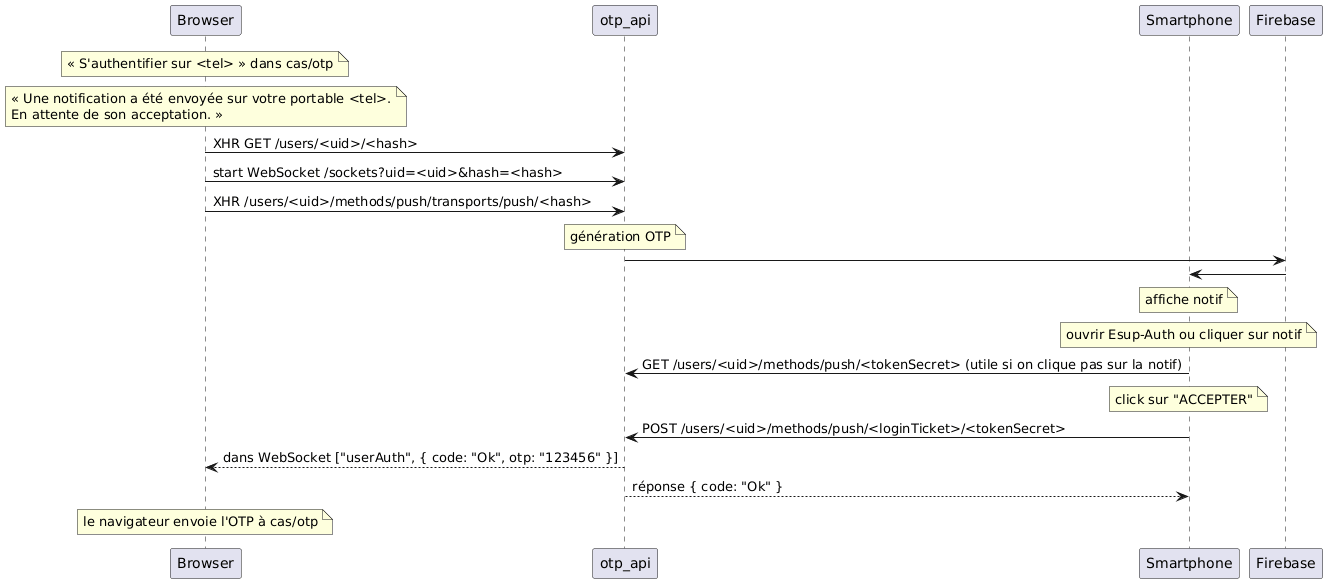
Généré avec plantuml.com avec :
@startuml
note over Browser : « S'authentifier sur <tel> » dans cas/otp
note over Browser : « Une notification a été envoyée sur votre portable <tel>.\nEn attente de son acceptation. »
Browser -> otp_api: XHR GET /users/<uid>/<hash>
Browser -> otp_api: start WebSocket /sockets?uid=<uid>&hash=<hash>
Browser -> otp_api: XHR /users/<uid>/methods/push/transports/push/<hash>
note over otp_api : génération OTP
participant Smartphone
otp_api -> Firebase
Firebase -> Smartphone
note over Smartphone : affiche notif
note over Smartphone : ouvrir Esup-Auth ou cliquer sur notif
Smartphone -> otp_api: GET /users/<uid>/methods/push/<tokenSecret> (utile si on clique pas sur la notif)
note over Smartphone : click sur "ACCEPTER"
Smartphone -> otp_api: POST /users/<uid>/methods/push/<loginTicket>/<tokenSecret>
otp_api --> Browser: dans WebSocket ["userAuth", { code: "Ok", otp: "123456" }]
otp_api --> Smartphone : réponse { code: "Ok" }
note over Browser : le navigateur envoie l'OTP à cas/otp
@enduml
Authentification NFC avec application Esup-Auth
NB : utilise ESUP-NFC-TAG-SERVER
NB : pour être plus complet, on pourrait mettre les reqs esup_nfc_tag_server vers LDAP
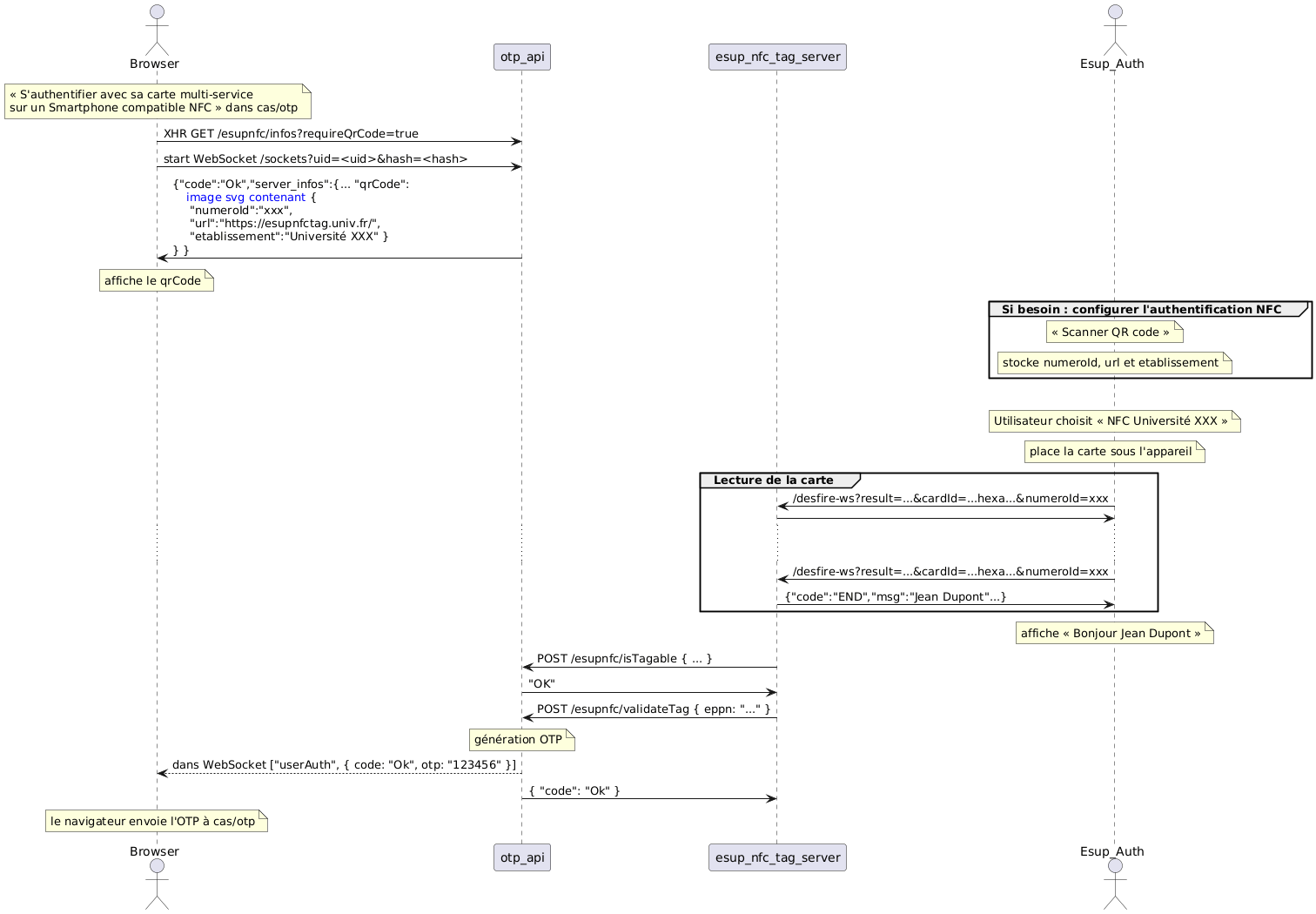
@startuml
actor Browser
note over Browser : « S'authentifier avec sa carte multi-service\nsur un Smartphone compatible NFC » dans cas/otp
Browser -> otp_api: XHR GET /esupnfc/infos?requireQrCode=true
Browser -> otp_api: start WebSocket /sockets?uid=<uid>&hash=<hash>
otp_api -> Browser: {"code":"Ok","server_infos":{... "qrCode":\n    <font color=blue>image svg contenant</font> {\n     "numeroId":"xxx",\n     "url":"https://esupnfctag.univ.fr/",\n     "etablissement":"Université XXX" }\n} }

note over Browser : affiche le qrCode

participant esup_nfc_tag_server
actor Esup_Auth

group Si besoin : configurer l'authentification NFC
note over Esup_Auth : « Scanner QR code »
note over Esup_Auth : stocke numeroId, url et etablissement
end

|||

note over Esup_Auth : Utilisateur choisit « NFC Université XXX »
note over Esup_Auth : place la carte sous l'appareil
group Lecture de la carte
Esup_Auth -> esup_nfc_tag_server: /desfire-ws?result=...&cardId=...hexa...&numeroId=xxx
esup_nfc_tag_server -> Esup_Auth
...  ...
Esup_Auth -> esup_nfc_tag_server: /desfire-ws?result=...&cardId=...hexa...&numeroId=xxx
esup_nfc_tag_server -> Esup_Auth: {"code":"END","msg":"Jean Dupont"...}
end
note over Esup_Auth : affiche « Bonjour Jean Dupont »

esup_nfc_tag_server -> otp_api: POST /esupnfc/isTagable { ... }
otp_api -> esup_nfc_tag_server: "OK"
esup_nfc_tag_server -> otp_api: POST /esupnfc/validateTag { eppn: "..." }
note over otp_api : génération OTP
otp_api --> Browser: dans WebSocket ["userAuth", { code: "Ok", otp: "123456" }]
otp_api -> esup_nfc_tag_server: { "code": "Ok" }
note over Browser : le navigateur envoie l'OTP à cas/otp
@enduml